
Why This Matters
YogaPros is a professional community. Following your peers helps you stay connected, build meaningful relationships, and support one another’s growth. When you follow someone, you’re actively investing in the kind of supportive network that helps yoga teachers thrive.
What This Means For You
- View your list of followed peers from your dashboard.
- Receive updates when they publish new events.
- Get notified when they complete a Growth Journey.
- Congratulate them directly on the platform when they hit milestones.
- Build a personalised network of professionals you admire and want to stay connected with.
What You Need To Do
- Log in to your YogaPros account.
- Click 'Teacher Connect' to find yoga professionals (by name, location, or specialism).
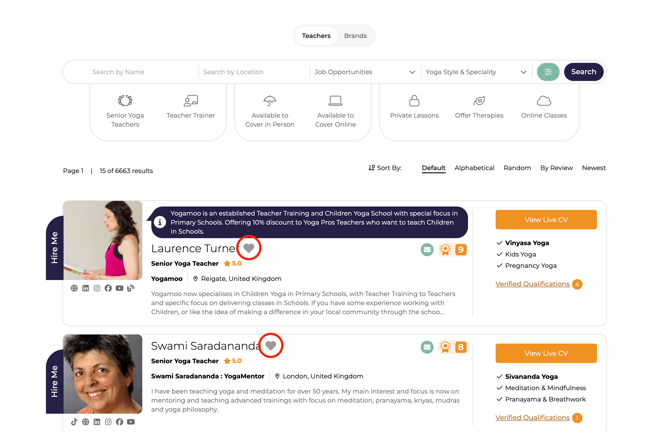
- On the search results page, look for the heart icon next to each member’s listing.
- Click the heart icon to follow that member.
To unfollow a peer, simply click the heart icon again to toggle it off.