
Why This Matters
Reviews play an important role in building your credibility as a Brand. They help future students trust your work and make informed decisions about training with you.
What This Means for You
Asking for reviews can feel uncomfortable at first, but it becomes easier when it’s part of your normal process. Being clear and honest about why you’re asking helps students feel more comfortable leaving feedback.
Over time, this builds your reputation and helps your courses stand out.
What You Need to Do
- Log in and click on your profile icon
- Click 'Request Brand Reviews' (the link will automatically copy)
- Share this link with your students
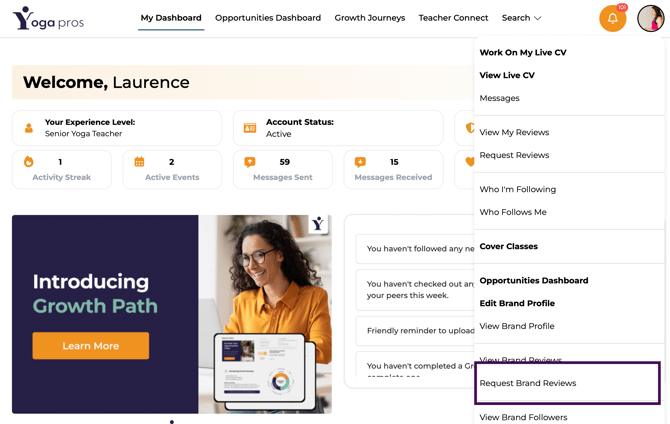 LiveCV Shown: Laurence Turner (YogaMoo)
You can share your link in different ways:
- In-person in a group setting (last session of the course or your graduation ceremony)
- Send an email communication
- Offer incentives such as a discount on your next training course
- Make it more casual by sending a link in a WhatsApp group
- Add it to your routine/schedule! Practice is key