
Why This Matters
Your YogaPros membership is a professional growth platform designed to help you build visibility, strengthen your CV, and create more opportunities.
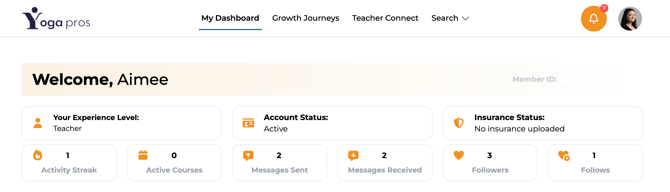
The new dashboard analytics connect the dots between your activity and your results. They show you that the more you use the platform, the more visible you become to other teachers, training providers, and potential connections.
If you are not using key features like messaging, following, or staying active, your dashboard will reflect that. Lower activity can mean fewer conversations, fewer CV interactions, and fewer opportunities to build your network.
What This Means for You
- You can now see the value of your membership more clearly in one place
- You can track how active you are on the platform
- You can understand how your engagement affects your visibility
- If you are not messaging, following, or staying active, people are less likely to engage with you
- If you do use the platform consistently, you are more likely to build connections and get more value from your membership
- Your dashboard helps you spot what needs attention
What You Need to Do
- Log in to your YogaPros dashboard regularly
- Review each dashboard card to understand your current activity and profile status
- Check whether your account and insurance details are up to date
- Use features like messaging and following to become more active in the community
- Use your dashboard as a prompt to take action, not just as a summary
What each dashboard metric means
-
Experience Level
This shows your current membership level, such as New Teacher, Experienced Yoga Teacher, or Senior Yoga Teacher. It helps you understand where you are on the YogaPros career path.
-
Account Status
This confirms whether your account is active. An active account means your membership is live and your CV is part of the YogaPros network.
-
Insurance Status
This shows whether you have uploaded your insurance. If this is missing, your profile may need attention.
-
Activity Streak
This shows how consistently you are using the platform, it's your daily streak. Regular activity helps keep you engaged and makes it easier to get ongoing value from your membership.
-
Active Courses
This shows how many current courses are connected to your profile. It helps you track what you are actively offering or involved in.
-
Messages Sent
This shows how many conversations you have started. Sending messages is one of the clearest signs that you are actively using your membership to connect with others.
-
Messages Received
This shows how many people are reaching out to you. This can reflect your visibility, CV strength, and how engaged you are on the platform.
-
Followers
This shows how many people are following your profile. A higher number can indicate that people are interested in what you do and want to keep up with your work.
-
Follows
This shows how many people you are following. Following other members helps you build relationships and stay connected to the wider YogaPros community.
General
The new dashboard analytics are available to Professional members and Brand members. They help you understand how to get more from your YogaPros membership. The more actively you use the platform, the more likely you are to build visibility, connection, and professional opportunities.