
Why This Matters
Reviews are a core part of your professional presence. They contribute directly to your Opportunities Score, influence your visibility across the platform, and show potential partners and studios the value you bring.
What This Means for You
- Your Live CV is updated and visible to students, employers, and peers
- More (and recent) reviews = higher Opportunities Score and greater visibility
- Reviews offer meaningful insight into how students experience your classes
- A strong review profile helps you attract new clients and partnerships
What You Need to Do
- Log in to your Yoga Pros account
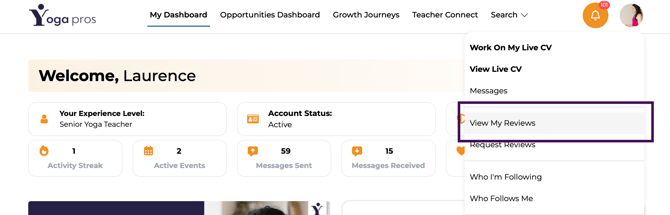
- Click your profile icon in the top right corner
- Select 'View My Reviews'
 LiveCV shown: Laurence Turner
Pro Tip: You can share the link to your LiveCV with students and encourage them to leave a review directly to your profile.